
Creating a "Web App": Route53 Health Check Alternative
A cheaper alternative to Route53 Health Checks created by yours truy.

Today, I was sitting at my desk thinking of ways I could implement some more Python into my project. I know Python, but I’m always looking for ways to improve my skills. While playing around with the requests library I thought,
“Why not find a way to check if the site is up periodically, and send yourself an email if the site is not up?”
I knew sending an email to myself was possible via Simple Email Service (SES) because of the contact form I had already implemented. So all I had to do was do something similar in Python. This acts similar to a health check in Route53, I just feel better about it because I did it myself.
Requirements
So… I planned to make a request to all of the pages on my site, if I’m getting a 200 response then the script will output that the page is healthy, if not the script will output that the page is unhealthy and will send me an email telling me to remediate the issue. Once the script is created I need to change this to a lambda function that will be triggered to run every hour. Here a diagram of this configuration is Route53:
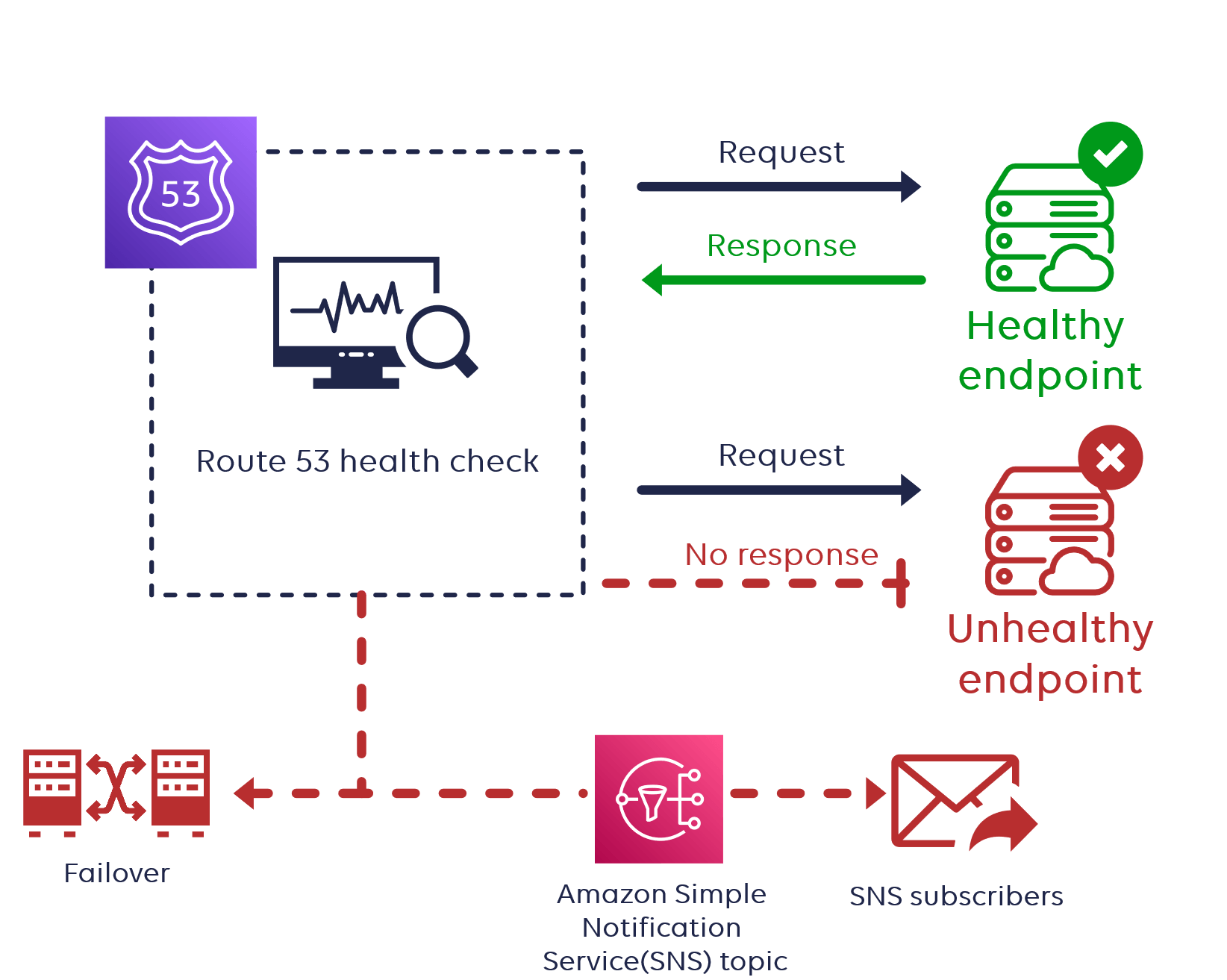
If this site was generating revenue, potentially being down for an hour is a very long time, but this is not the case. The traffic on this site isn’t going to be high (at least for now) so I am comfortable with a maximum 1 hour Time to Detection (TTD).
Phase 1
In phase 1, I created an infinite loop to check the site pages every hour. I also imported the boto3 library, which is a Python library created by AWS to interact with AWS resources, but I am not using anything in this library yet.
import requests
import boto3
import time

base_url = "https://website.com/"
pages = {"portfolio", "contact", "jondoe", "london"}
headers = {
    "User-Agent": "Mozilla/5.0 (Windows NT 10.0; Win64; x64; rv:109.0) Gecko/20100101 Firefox/116.0"
}

while True:
    for page in pages:
        response = requests.get(f'{base_url}{page}', headers=headers)
        code = response.status_code
        if code == 200:
            print(f"{base_url}{page} is healthy")
        else:
            print(f"{base_url}{page} is not responding properly, login and remediate error.")
    time.sleep(3600)
This works but this isn’t sending any emails, it is hosted locally on VSCode, isn’t a lambda function, should I keep going?
Phase 2
Next, I had to figure out how to get this script to send an email if one of the pages on the site is not responding with a 200. This means before that I need to figure out how to send an email in Python.
Now the boto3 library is put to work. Looking into the SES documentation I found out how to send the email:
import boto3
from botocore.exceptions import ClientError

# Replace sender@example.com with your "From" address.
# This address must be verified with Amazon SES.
SENDER = "Sender Name <sender@example.com>"

# Replace recipient@example.com with a "To" address. If your account
# is still in the sandbox, this address must be verified.
RECIPIENT = "recipient@example.com"

# Specify a configuration set. If you do not want to use a configuration
# set, comment the following variable, and the
# ConfigurationSetName=CONFIGURATION_SET argument below.
CONFIGURATION_SET = "ConfigSet"

# If necessary, replace us-west-2 with the AWS Region you're using for Amazon SES.
AWS_REGION = "us-west-2"

# The subject line for the email.
SUBJECT = "Amazon SES Test (SDK for Python)"

# The email body for recipients with non-HTML email clients.
BODY_TEXT = ("Amazon SES Test (Python)\r\n"
             "This email was sent with Amazon SES using the "
             "AWS SDK for Python (Boto)."
            )

# The HTML body of the email.
BODY_HTML = """<html>
<head></head>
<body>
  <h1>Amazon SES Test (SDK for Python)</h1>
  <p>This email was sent with
    <a href='https://aws.amazon.com/ses/'>Amazon SES</a> using the
    <a href='https://aws.amazon.com/sdk-for-python/'>
      AWS SDK for Python (Boto)</a>.</p>
</body>
</html>
            """

# The character encoding for the email.
CHARSET = "UTF-8"

# Create a new SES resource and specify a region.
client = boto3.client('ses',region_name=AWS_REGION)

# Try to send the email.
try:
    #Provide the contents of the email.
    response = client.send_email(
        Destination={
            'ToAddresses': [
                RECIPIENT,
            ],
        },
        Message={
            'Body': {
                'Html': {
                    'Charset': CHARSET,
                    'Data': BODY_HTML,
                },
                'Text': {
                    'Charset': CHARSET,
                    'Data': BODY_TEXT,
                },
            },
            'Subject': {
                'Charset': CHARSET,
                'Data': SUBJECT,
            },
        },
        Source=SENDER,
        # If you are not using a configuration set, comment or delete the
        # following line
        ConfigurationSetName=CONFIGURATION_SET,
    )
# Display an error if something goes wrong.
except ClientError as e:
    print(e.response['Error']['Message'])
else:
    print("Email sent! Message ID:"),
    print(response['MessageId'])
This is pretty messy. So I’m not going to use all of this, but I can take the bits and pieces and use them in my script while also changing some of the information. In the else statement when the script prints f”{base_url}{page} is not responding properly, login and remediate error.” I also want an email to be sent at the same time.
import requests
import boto3
from botocore.exceptions import ClientError
import time

base_url = "https://website.com/"
pages = {"portfolio", "contact", "jondoe", "london", "graduation", "pelondon", "jacks", "rich", "nyc", "chamberlain", "idk"}
headers = {
    "User-Agent": "Mozilla/5.0 (Windows NT 10.0; Win64; x64; rv:109.0) Gecko/20100101 Firefox/116.0"
}

SENDER = "email@email.com"
RECIPIENT = "email@email.com"
# CONFIGURATION_SET = "ConfigSet"
AWS_REGION = "us-east-1"
SUBJECT = "Website Health Check"

while True:
    for page in pages:
        response = requests.get(f'{base_url}{page}', headers=headers)
        code = response.status_code
        if code == 200:
            print(f"{base_url}{page} is healthy")
        else:
            print(f"{base_url}{page} is not responding properly, login and remediate error.")
            try:
                client = boto3.client('ses', region_name=AWS_REGION)
                response = client.send_email(
                    Destination={
                        'ToAddresses': [
                            RECIPIENT,
                        ],
                    },
                    Message={
                        'Body': {
                            'Text': {
                                'Charset': 'UTF-8',
                                'Data': f"{base_url}{page} is not responding properly, please remediate error.",
                            },
                        },
                        'Subject': {
                            'Charset': 'UTF-8',
                            'Data': SUBJECT,
                        },
                    },
                    Source=SENDER,
                    # ConfigurationSetName=CONFIGURATION_SET,
                )
            except ClientError as e:
                print(e.response['Error']['Message'])
            else:
                print("Email sent! Message ID:"),
                print(response['MessageId'])
    time.sleep(3600)

}
Okay so at this point I was getting somewhere. I was still in the dilemma of this being an infinite loop that is running locally on VSCode, so now the next step is figuring out how to run this as a lambda function. At first, I was thinking maybe I should run this on a Raspberry Pi or one of my spare computers, but I don’t run my problems I solve them.

Phase 3
The hardest phase of them all…turning this script into a lambda function. After a few Reddit, StackOverflow, and AWS blog posts, I was ready to reform this script. Making this into a lambda function wasn’t the hard part, it was the issue of importing the requests library into Lambda. I found this post on AWS re:Post that explained how to import modules into Lambda. You have to create a zip file of the module and publish it as a layer that is compatible with the runtime of the function.
$ aws lambda publish-layer-version --layer-name requests-layer --zip-file fileb://layer.zip --compatible-runtimes python3.11 --region us-east-1Once the layer was published, the lambda function tests were running correctly with this code:
import os
import requests
import boto3
import time
from botocore.exceptions import ClientError

base_url = "https://website.com/"
pages = {"portfolio", "contact", "jondoe", "london", "graduation", "pelondon", "jacks", "rich", "nyc", "chamberlain", "idk"}
headers = {
    "User-Agent": "Mozilla/5.0 (Windows NT 10.0; Win64; x64; rv:109.0) Gecko/20100101 Firefox/116.0"
}

SENDER = "email@email.com"
RECIPIENT = "email@email.com"
AWS_REGION = "us-east-1"
SUBJECT = "Website Health Check"

def lambda_handler(event, context):
    for page in pages:
        response = requests.get(f'{base_url}{page}', headers=headers)
        code = response.status_code
        if code == 200:
            print(f"{base_url}{page} is healthy")
        else:
            print(f"{base_url}{page} is not responding properly, login and remediate error.")
            try:
                client = boto3.client('ses', region_name=AWS_REGION)
                response = client.send_email(
                    Destination={
                        'ToAddresses': [
                            RECIPIENT,
                        ],
                    },
                    Message={
                        'Body': {
                            'Text': {
                                'Charset': 'UTF-8',
                                'Data': f"{base_url}{page} is not responding properly, please remediate error.",
                            },
                        },
                        'Subject': {
                            'Charset': 'UTF-8',
                            'Data': SUBJECT,
                        },
                    },
                    Source=SENDER,
                )
            except ClientError as e:
                print(e.response['Error']['Message'])
            else:
                print("Email sent! Message ID:")
                print(response['MessageId'])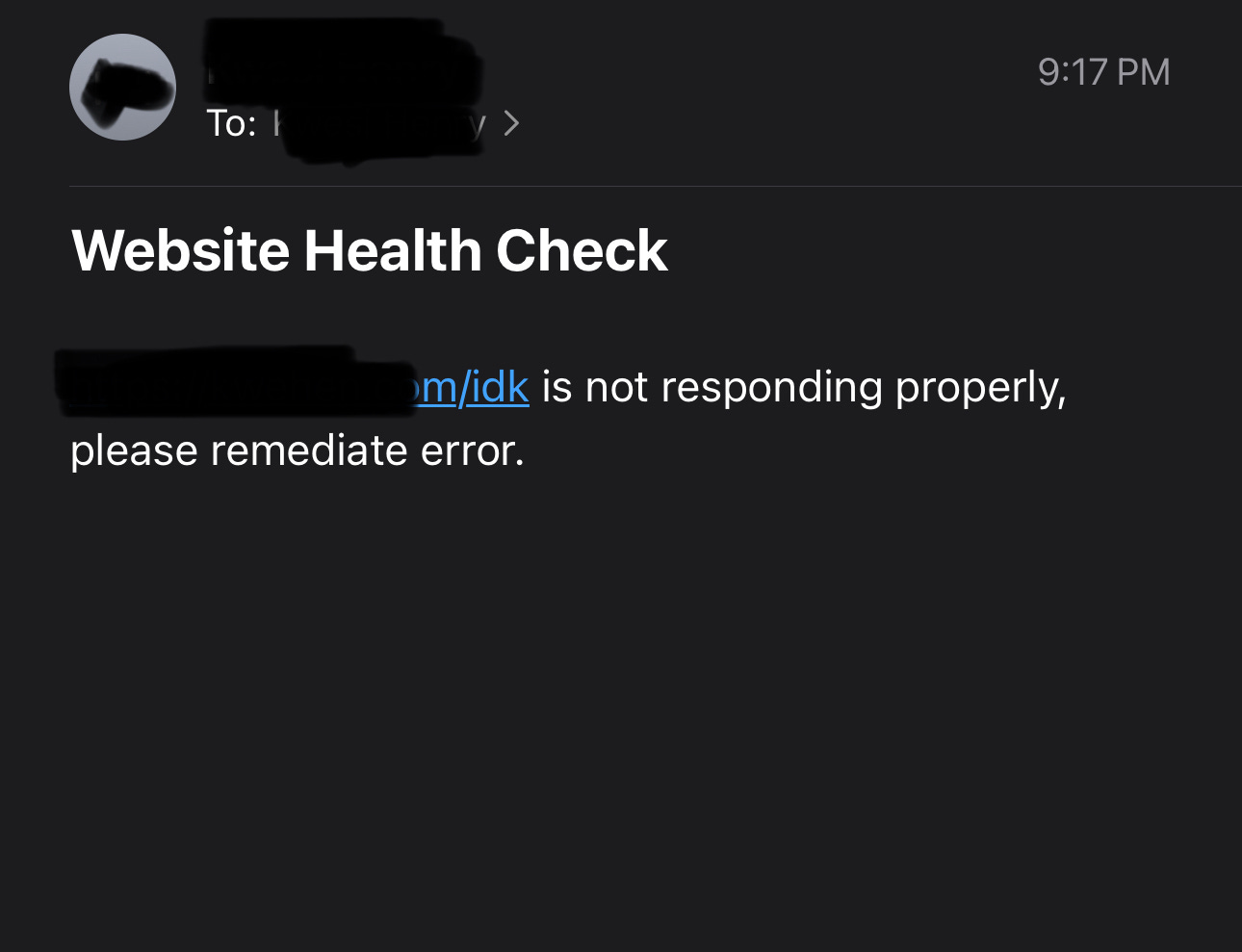
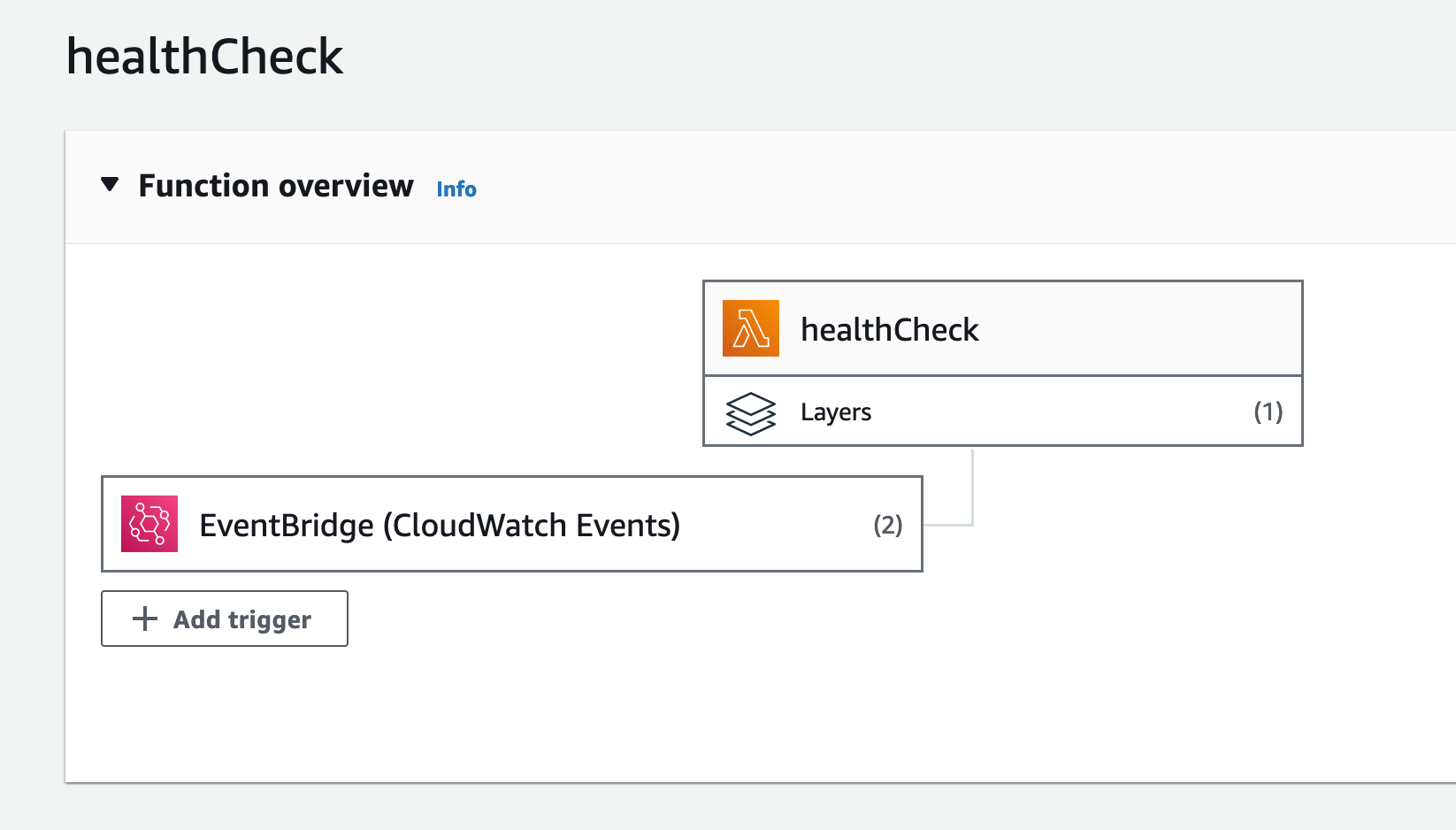
The last thing is adding a trigger to make this function execute every hour. This was much simpler than I originally expected, all it takes is adding an EventBrige trigger and creating a new rule with the schedule expression of “rate(1 hour)". I now created my own health checks with lambda.
Cost Savings
It was a good experience creating this health check, but let’s get to the good part, the cost savings. Route53 health checks cost $0.50 per month per route and run every 30 seconds. This comes up to $6 per year. Doesn’t sound like much but let’s imagine you have multiple organizations under your AWS account with150 health checks, this comes out to $900. I am only running this lambda function once per hour, which is 8,760 invocations per month, at an average of 2200 ms for the duration of each function with 128 MB of memory allocated and 512 MB of ephemeral storage allocated this will cost me only $0.04 per month. Even if I were to run this function every 30 seconds like the health checks, the cost would only come out to $0.42 per month. For 150 health checks, this comes out to $756, a savings of $144. Honestly, this isn’t much, but I am glad I came up with a cheaper alternative to running the health checks. The first 1 million lambda invocations per month are always free on AWS, this function would only get called 87,600 times per month which would essentially make this health check free.
What’s next?
I’m still building the site, I’m almost done just adding some of the finishing touches. I’m completing some “side-quests” like these in the meantime to build additional skills. Why? Who knows, I know it will all pay off in the long run. Stay tuned for more blog posts on creating this app pretty soon.