
Inbound & Outbound Email Security: Part 1
Using SPF, DKIM, DMARC, and Sublime Security for comprehensive organizational email security.

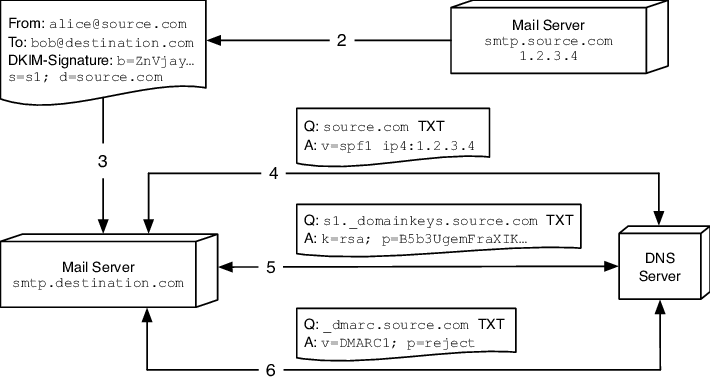
What are SPF, DKIM, and DMARC?
SPF, DKIM, and DMARC are email authentication protocols that work together to improve email security. SPF (Sender Policy Framework) is a mechanism that allows email recipients to verify that incoming email messages are from an IP address authorized by the sender's domain. It works by checking the DNS records of the sender's domain to see if the IP address of the sender's email server is authorized to send emails on behalf of that domain. DKIM (DomainKeys Identified Mail) is a cryptographic mechanism that allows email recipients to verify that the sender of an email message is authorized to send messages on behalf of the domain in the message header. It uses a public key encryption system to verify the signature in the email header against the public key in the DNS records of the sender's domain. DMARC (Domain-based Message Authentication, Reporting, and Conformance) is a policy framework that combines SPF and DKIM. It allows email senders to instruct email receivers on how to handle unauthenticated messages, improving the accuracy of email filtering and reducing the likelihood of successful phishing attacks. DMARC also provides feedback to the sender about how their emails are being handled by receivers, which can be used to improve email deliverability and reduce the likelihood of false positives.
An Indianapolis-based email intelligence platform, today released their report, Global DMARC Adoption 2019, revealing 79.7% of all domains analyzed have no DMARC policy in place. By implementing DMARC, brands lower the odds of their domains being spoofed and used for phishing attacks on recipients. The result of a domain not implementing any form of DMARC policy is exposing its recipients to possible phishing attacks and, unsurprisingly, 91% of all cyber attacks begin with a phishing email.
Source: Business Wire
Configuration
SPF
Again, Sender Policy Framework (SPF) is an email authentication protocol that enables email recipients to check if incoming emails are from a legitimate sender. SPF works by checking the sender's IP address against a list of authorized IP addresses stored in the DNS records of the sender's domain. If the IP address is authorized, the email is considered legitimate, and it is delivered to the recipient's inbox. If the emails fail the check from the SPF Record, it is subject to the spam policy of the receiver’s email server.
Let’s configure an SPF Record:
Go to your DNS/domain provider and add a record.
Name: @ - to cover your whole domain.
Type: TXT - This is a TXT Record.
TTL: Default - You can also set this to “1h”.
Data:
v=spf1 ip4:142.243.364.25/30 include:spf-005f4802.pphosted.com
include:spf.protection.outlook.com -all
“v=spf1” - indicates this is an SPF record.
“ip4:142.243.364.25/30” - This is the CIDR range that can send emails from your domain. You can put multiple IPs or a CIDR range.
“include:spf-oo5f4802.pphosted.com & include:spf.protetion.outlook.com” - this indicates the domains that can send an email on your domain’s behalf. “…pphosted.com” is the domain for Proofpoint an organization that offers many email security products, including SPF protection.
“-all” - This indicates a hard fail if an email comes from your domain but not from an IP listed in the SPF record. The receiving email server should reject the email.
if “~all” was used the receiving email server would mark the email as spam.
If you own domains that should be sending email, go to your DNS records and add this SPF Record:
v=spf1 -allDKIM
DomainKeys Identified Mail (DKIM) is an email authentication protocol that uses public key cryptography to validate the authenticity of an email message. DKIM works by adding a digital signature to the header of the email message using the private key of the sending domain. The private key is stored on the sending email server. The recipient's mail server can then use the public key stored in the DNS records of the sending domain to verify the digital signature and confirm the email's authenticity. You’ll need to configure a DKIM record for every email company you use that supports DKIM.
Configuring a DKIM record is a little different but it goes as such:
Name: proofpoint._domainkey (sticking with the Proofpoint example) - this typically follows the format of “selector1._domainkey”. The selector is the name of the email company you use.
Type: TXT (This could also be a CNAME record if using a URL instead of a key)
TTL: Default
Data:
v=DKIM1; k=rsa; p=kjrhbhuasdbHH789487323Hdhfjsjdoiiutbsasdbwspkl/++dhebehbrwiqjwnSFTrhfieutuonsndhfopwklwyr6747901dfIUytcsdcrRRThbdfbiuahsd/djgbhdbooquwetvuasb87Gt8y7“v=DKIM1” - indicates this is a DKIM Record.
“k=rsa” - This is the type of public key that is being used.
“p=kjrhbhu…” - This is the public key that is checked by receiving email servers to match your private key
For domains that you own, that should not send email, set a DKIM record saying:
Name: *._domainkey
v=DKIM1; p=DMARC
Domain-based Message Authentication, Reporting, and Conformance (DMARC) is an email authentication protocol that allows email domain owners to specify which authentication methods are employed for incoming email messages. DMARC provides a way for email recipients to check if incoming messages are authenticated using SPF or DKIM, and to determine how to handle messages that fail authentication checks. DMARC also provides reporting capabilities, allowing domain owners to receive reports about how their domains are being used for email and to take appropriate actions to protect their domains from abuse.
Configuring a DMARC record should look something like this:
Name: _dmarc
Type: TXT
TTL: Default
Data:
v=DMARC1; p=reject; pct=100; fo=1;
rua=mailto:dmarc_rua@emaildefense.proofpoint.com
ruf=mailto:dmarc_ruf@emaildefense.proofpoint.com
“v=DMARC1” - indicates this is a DMARC record.
“p=reject” - this is what is to be done if SPF or DKIM fail. Options are “none”, “quarantine”, or “reject”.
“pct=100” - this is the percentage of enforcing this policy. Meaning 100% of the time if SPF or DKIM fails it will be rejected.
“fo=1” - this can be used when SPF or DKIM are having issues verifying any email.
“rua=mailto:dm…” - this is where DMARC reports are sent to daily.
“ruf'=mailto:dm…” - this is where DMARC reports for failed emails are sent as they happen.
For domains you own, that should not send email, you will want to set this DMARC record:
Name: _dmarc
Type: TXT
TTL: Default
v=DMARC1; p=reject; pct=100Verification
You can verify that all your records were configured properly and available by going Dmarcian and entering your domain name.
Benefits
Using SPF, DKIM, and DMARC in combination provides several benefits for an organization. Firstly, these authentication protocols enable your organization to prevent unauthorized parties from sending emails on your behalf, reducing the risk of phishing and email fraud. Secondly, implementing these protocols can improve email deliverability rates by reducing the likelihood of legitimate emails being marked as spam or rejected by recipient servers. Using these authentication protocols can also enhance the reputation of your organization, preventing your domain from being used as a pivot point for “hackers”.
These authentication protocols will protect against emails flowing outbound from your organization. But what about inbound? In part two of this blog post, I’ll be using Sublime Security’s email Detection Platform to show how your organization can protect against inbound emails with Detection-as-Code.
Sources:
EasyDmarc. “What Is a DMARC Failure Report?” EasyDMARC, 10 Oct. 2022, easydmarc.com/blog/what-is-a-dmarc-failure-report/.
“Email DNS Master Course | SPF + DKIM + DMARC Explained.” YouTube, 16 Oct. 2021, www.youtube.com/watch?v=S6id_BPFHcY.
“Email Protection - Email Security Solutions: Proofpoint Us.” Proofpoint, 8 May 2023, www.proofpoint.com/us/products/email-security-and-protection.
MSFTTracyP. “How to Use DKIM for Email in Your Custom Domain - Office 365.” How to Use DKIM for Email in Your Custom Domain - Office 365 | Microsoft Learn, learn.microsoft.com/en-us/microsoft-365/security/office-365-security/email-authentication-dkim-configure?view=o365-worldwide. Accessed 12 May 2023.
“Increasing Your Email Security with DKIM, SPF, and DMARC.” YouTube, 2 Apr. 2021, www.youtube.com/watch?v=FMNHN5s_tWQ.