
Kubernetes the not so hard way? Part 2
Persistent headache...I mean storage.

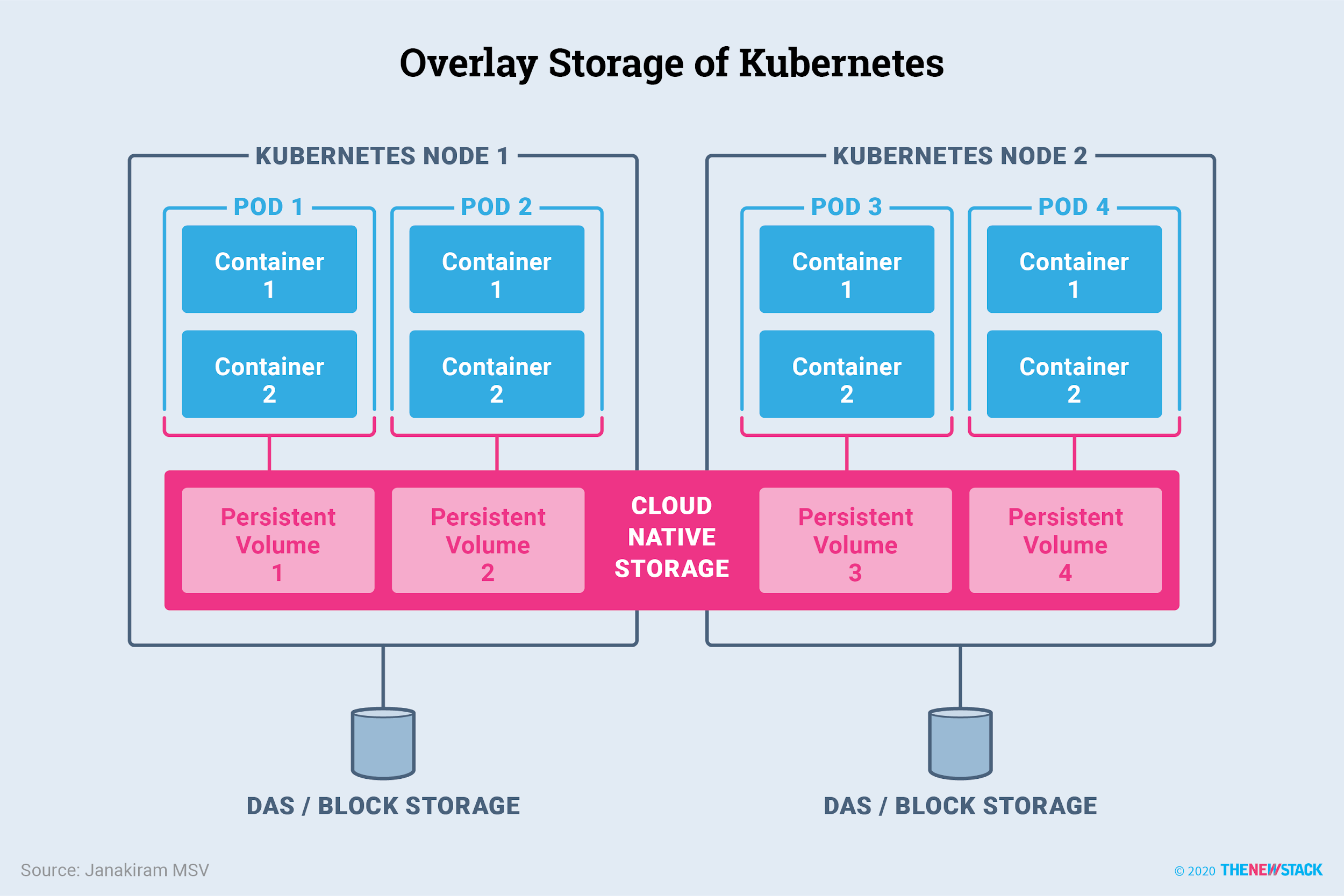
Persistent storage in containerized applications can be a headache. Containers are made to be ephemeral. Started, stopped, destroyed, and recreated as often as needed. This makes running a production application difficult if your application is restarted and data is not persisted in the new container. That is why there needs to be a way for applications to persist data across restarts and recreations.
In Docker, this is done easily with a simple flag in your docker run command or an extra line in your compose file.
docker run -it -v ${PWD}/scripts:/code/scripts myimage bashversion: '3.8'
services:
web:
image: nginx
volumes:
- web_data:/var/www/html
web-test:
image: nginx
volumes:
- web_data:/var/www/htmlThough it is easy in Docker, the opposite can be said about Kubernetes, especially on-prem.
My need for persistent storage is to maintain data from Prometheus for my dashboards and reports in Grafana. Without historical context, I think having observability is essentially useless. That being said, trying to get persistent storage meant bricking my cluster and having to start all over. So here I am writing about it so if anyone else reads this, you don’t have to.
Prerequisites
In the last blog, I made sure you added a patch to add a patch to the machine config in Talos to ensure that Mayastor will work for persistent storage.
What is Mayastor?
Mayastor is a performance optimised "Container Attached Storage" (CAS) solution of the CNCF project OpenEBS. The goal of OpenEBS is to extend Kubernetes with a declarative data plane, providing flexible persistent storage for stateful applications.
What is OpenEBS?
OpenEBS turns any storage available to Kubernetes worker nodes into Local or Replicated Kubernetes Persistent Volumes. OpenEBS helps application and platform teams easily deploy Kubernetes stateful workloads that require fast and highly durable, reliable, and scalable Container Native Storage.
Lastly, make sure to have 3+ CPU cores on the worker nodes of your cluster. Mayastor’s I/O engine pods usually request 2 cores but this can be set to 1 (the minimum), according to a GitHub issue I submitted.
Configuration
To start, edit the machine config of your Talos worker nodes.
talosctl edit machineconfig -n x.x.x.x -e x.x.x.xextraMounts:
- destination: /var/local
type: bind
source: /var/local
options:
- bind
- rshared
- rw
Note: If you are adding/updating the
vm.nr_hugepageson a node which already had theopenebs.io/engine=mayastorlabel set, you’d need to restart kubelet so that it picks up the new value, by issuing the following command
Talos Linux by default enables and configures the Pod Security Admission plugin to enforce Pod Security Standards with the baseline profile as the default enforced except kube-system namespace which enforces privileged profile.
To install Mayastor, you are going to have to change some configurations with the pod security standards:
kubectl label namespace mayastor pod-security.kubernetes.io/audit=privileged
kubectl label namespace mayastor pod-security.kubernetes.io/warn=privileged
kubectl label namespace mayastor pod-security.kubernetes.io/enforce=privileged
Next, installing Mayastor:
helm repo add mayastor https://openebs.github.io/mayastor-extensions/ helm install mayastor mayastor/mayastor -n mayastor --set=agents.ha.enabled=false --version 2.6.1 --set=io_engine.coreList='{1}'kubectl get pods -n mayastor
Lastly, you can deploy a test application to ensure persistent storage is working on your cluster:
cat <<EOF | kubectl create -f -
apiVersion: v1
kind: PersistentVolumeClaim
metadata:
  name: ms-volume-claim
spec:
  accessModes:
  - ReadWriteOnce
  resources:
    requests:
      storage: 1Gi
  storageClassName: <storage-class-name>
EOF
kubectl apply -f https://raw.githubusercontent.com/openebs/Mayastor/v1.0.2/deploy/fio.yamlkubectl get pvc ms-volume-claimkubectl exec -it fio -- fio --name=benchtest --size=800m --filename=/volume/test --direct=1 --rw=randrw --ioengine=libaio --bs=4k --iodepth=16 --numjobs=8 --time_based --runtime=60I tried Longhorn, stayed up until 3 AM, and destroyed my cluster so that you wouldn’t have to. Onto actually accessing the services we deploy…