
Writing Detection and Response Rules in LimaCharlie
Practice Writing D&R Rules on LimaCharlie's EDR with Atomic Red Team


In this post, I’ll be covering my experience writing Detection and Response (D&R) rules in LimaCharlie, a free Endpoint Detection and Response (EDR) tool that I deployed on a Windows AMI in AWS.
This post is a fork from Eric Capuano’s blog, So you want to be a SOC Analyst, a 4-part series where he will guide you through creating a lab with an attack and victim machine, installing an EDR sensor on the victim machine, generating a payload that results in Remote Code Execution (RCE) on the victim machine, and much more! I highly suggest checking out this lab as there is a lot of valuable information inside.
The configuration of this lab is all included in Eric’s blog, check out this link which holds the configuration section of the lab.
LimaCharlie has its own syntax for D&R rules, an alternative to this would be writing YARA rules, which are “malware detection patterns that are fully customizable to identify targeted attacks and security threats specific to your environment”. Today I’ll be writing the LimaCharlie D&R rules, YARA rules will be for an upcoming blog post.
What is an EDR? More specifically LimaCharlie?
Endpoint Detection and Response (EDR) is a type of cybersecurity technology that helps organizations detect and respond to security incidents on endpoints such as laptops, desktops, servers, and mobile devices. EDRs typically use a combination of data collection, analysis, and automated response capabilities to identify and mitigate threats. By providing real-time visibility into endpoint activity, EDR tools can help organizations quickly detect and respond to security incidents, minimize the impact of attacks, and prevent future incidents. If you’ve ever looked at some of your work computer’s hidden icons or task manager, you’ve probably seen a name like SentinelOne, Crowdstrike, Trelix Endpoint Security, or Microsoft Defender for Endpoint. These are all EDRs that your organization may or may not have installed on all endpoints.
LimaCharlie is a cloud-based Endpoint Detection and Response (EDR) platform designed to be easy to use, with a simple and intuitive interface, and offers a range of features, including threat hunting, automated response capabilities, and integration with other security tools. LimaCharlie also offers a community-driven approach to threat detection and response, with a large and active user base that shares threat intelligence and collaborates to develop effective security strategies.
What are Detection & Response Rules?
As described in the LimaCharlie Documentation, “Detection & Response rules automate actions based on the real-time events streaming into LimaCharlie. Each rule has two YAML descriptors: one that describes what to detect, and another that describes how to respond”. Learning the basics of writing D&R in LimaCharlie rules can be found in the LimaCharlie Documentation. For example, here is a detection rule to detect and block the Wanacry ransomware if the file path of a new process ends with “wanadecryptor.exe”.
 # Detection
op: ends with
event: NEW_PROCESS
path: event/FILE_PATH
value: wanadecryptor.exe
case sensitive: false

# Response
- action: report
  name: wanacry
- action: task
  command: history_dump
- action: task
  command:
    - deny_tree
    - <<routing/this>>
What is Atomic Red Team?
Atomic Red Team (ART) is a collection of open-source tools and techniques designed to test the effectiveness of endpoint security controls. It includes a library of "atomic tests" that simulate real-world attack scenarios, making it an effective tool for evaluating the resilience of an organization's security infrastructure. Atomic Red Team is maintained by Red Canary, a leading provider of threat detection and response services.
Creating D&R Rules
Okay, now that I’ve gotten the explanations out of the way, let’s get to the fun part.
I’m going to start with Atomic Test T1078.001 - Valid Accounts: Default Accounts.
“Adversaries may obtain and abuse credentials of a default account as a means of gaining Initial Access, Persistence, Privilege Escalation, or Defense Evasion. Default accounts are those that are built-into an OS, such as the Guest or Administrator accounts on Windows systems. Default accounts also include default factory/provider set accounts on other types of systems, software, or devices, including the root user account in AWS and the default service account in Kubernetes.” (Atomic Red Team Documentation)
In Atomic Test #1, the Guest account is enabled, added to the administrator group, and given RDP access. As described above, this technique would be used by adversaries “as a means of gaining Initial Access, Persistence, Privilege Escalation, or Defense Evasion”.
net user Guest /active:yes
net user Guest Password123
net localgroup Administrators Guest /add
net localgroup "Remote Desktop Users" Guest /add
reg add "hklm\system\CurrentControlSet\Control\Terminal Server" /v fDenyTSConnections /t REG_DWORD /d 0 /f
reg add "hklm\system\CurrentControlSet\Control\Terminal Server" /v "AllowTSConnections" /t REG_DWORD /d 0x1 /f
When running this command from the attack server, preconfigured Sigma rules will show '“Local Account Discovery” and “New User Created Via Net.EXE” in the Detections tab of LimaCharlie.

Clicking on the most recent “New User Created Via Net.EXE” alert, we can see some command line input:
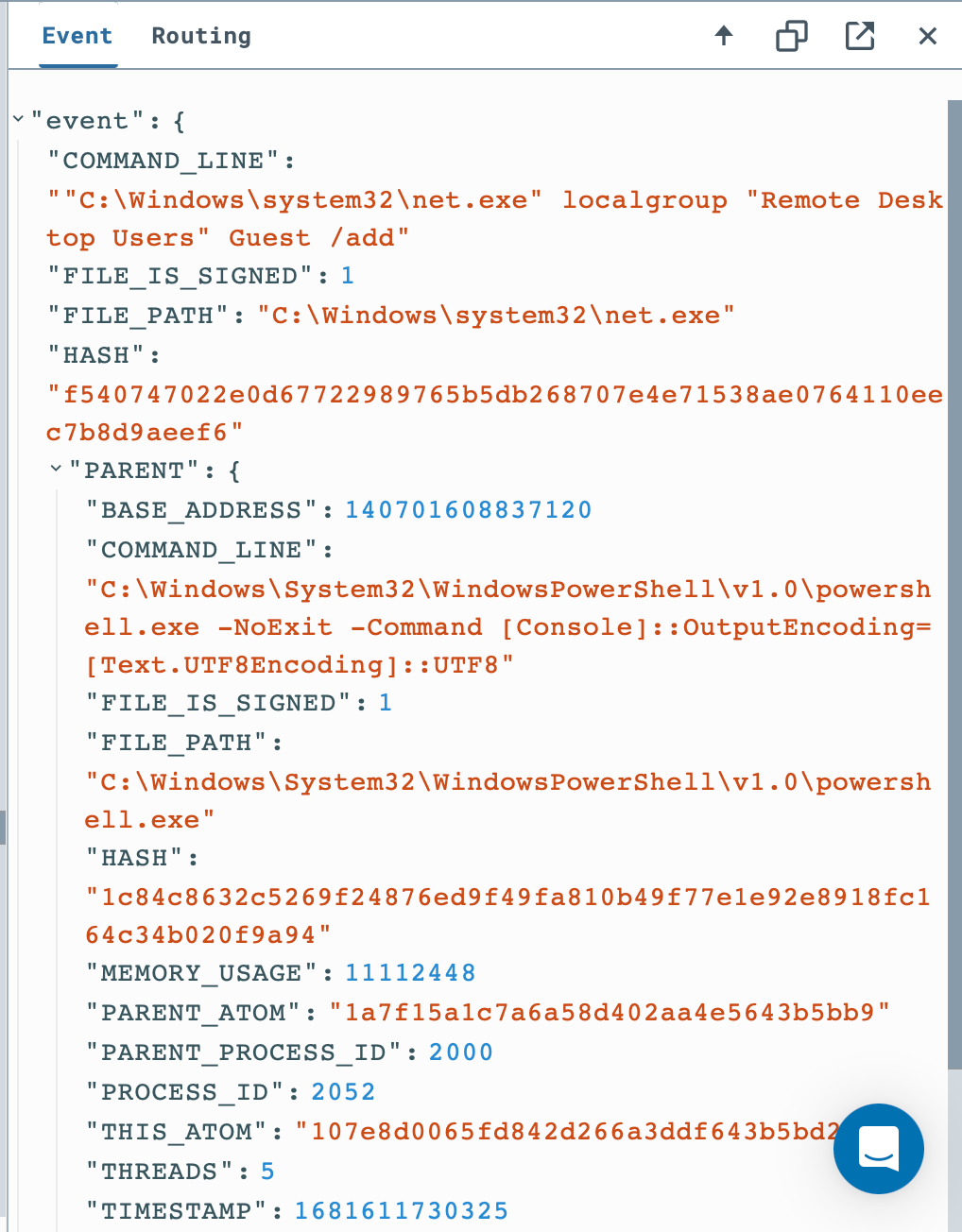
After viewing the event in the sensor’s timeline, we can move on to building a D&R rule for this type of event.
The default detection for this rule looks like this:
event: NEW_PROCESS
op: and
rules:
  - op: is
    path: event/FILE_PATH
    value: C:\Windows\system32\net.exe
  - op: is
    path: event/COMMAND_LINE
    value: '"C:\Windows\system32\net.exe" localgroup "Remote Desktop Users" Guest /add'
  - op: is
    path: routing/hostname
    value: ec2amaz-d57000g.ec2.internal
One piece of advice Eric gives in his blog is to use “more intelligent ways of matching on the command line instead of matching on a literal string”. As seen in the original detect rule, must contain the value:
'"C:\Windows\system32\net.exe" localgroup "Remote Desktop Users" Guest /add'Extra space between ‘net.exe’ and ‘localgroup’ would break our rule and we would not receive an alert. What if an account besides ‘Guest’ was being added to Remote Desktop Users? We’re going to make some changes.
event: NEW_PROCESS
op: and
rules:
  - op: is
    path: event/FILE_PATH
    value: C:\Windows\system32\net.exe
  - op: contains
    path: event/COMMAND_LINE
    value: localgroup
  - op: contains
    path: event/COMMAND_LINE
    value: Remote Desktop Users
  - op: contains
    path: event/COMMAND_LINE
    value: /add
Now, regardless of the space or syntax of the command line input, the event will be detected across all sensors. Now let’s make a response:
- action: report
  name: RDP_Group_Access
In this action, an alert named ‘Remote_Group_Access’ will be created. This alert could be noisy if the system administrators access the Remote Desktop Group often, but would provide visibility over the group in the case of persistence being established.
Now let’s rerun the Atomic Test (after running the cleanup) and see if an alert is generated.
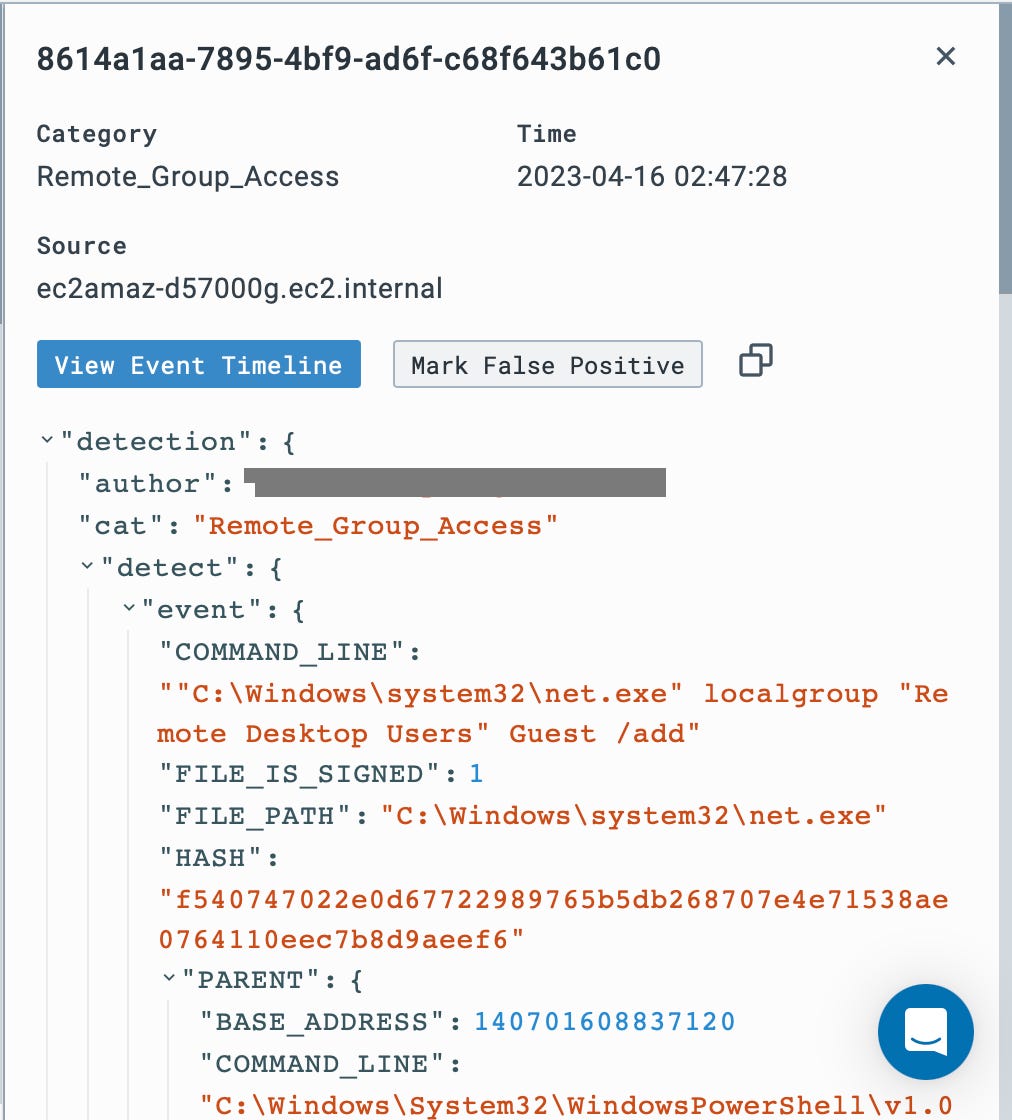
Let’s create another D&R Rule!
This time we’re going to run ART Test T1070.001 - Indicator Removal on Host: Clear Windows Event Logs
“Adversaries may clear Windows Event Logs to hide the activity of an intrusion. Windows Event Logs are a record of a computer's alerts and notifications. There are three system-defined sources of events: System, Application, and Security, with five event types: Error, Warning, Information, Success Audit, and Failure Audit.” (Atomic Red Team)
From our Sliver-server shell, we’ll run the command:
wevtutil cl securityThis command clears Windows Event Log: Security.
Back in LimaCharlie, in the timeline, there is a new process for wevtutil.exe with some command line input:
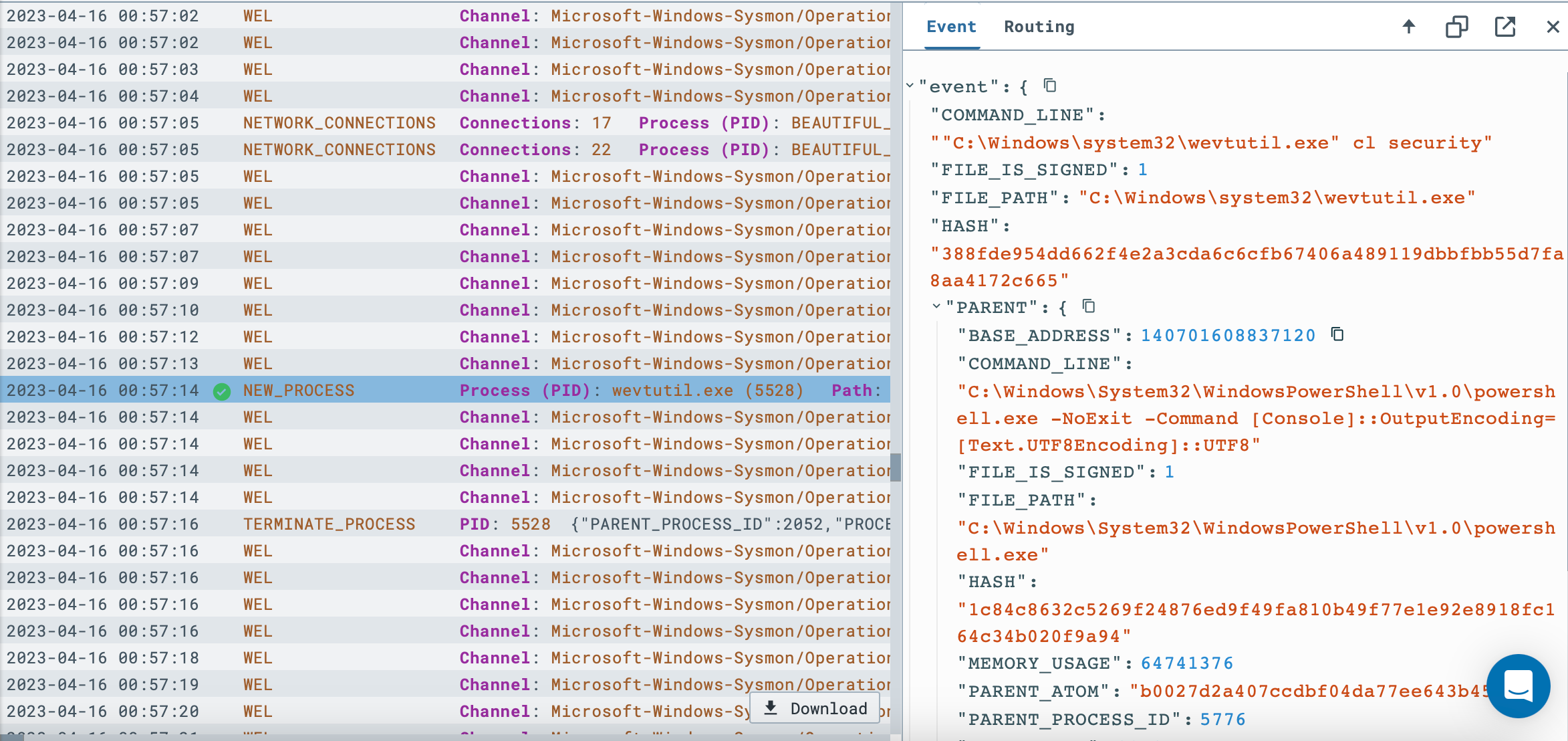
We can see the event, now let’s create a D&R rule so this doesn't happen again. The original rule before making some changes looks as such:
event: NEW_PROCESS
op: and
rules:
  - op: is
    path: event/FILE_PATH
    value: C:\Windows\system32\wevtutil.exe
  - op: is
    path: event/COMMAND_LINE
    value: '"C:\Windows\system32\wevtutil.exe" cl security'
  - op: is
    path: routing/hostname
    value: ec2amaz-d57000g.ec2.internal
There are some key changes I want to make, first I want this rule applied across all hosts. Second, like the first rule, I don’t want slight changes in syntax to keep this alert from being generated. What if has a much longer command and clearing the security event log is only a piece?
event: NEW_PROCESS
op: and
rules:
  - op: is
    path: event/FILE_PATH
    value: C:\Windows\system32\wevtutil.exe
  - op: contains
    path: event/COMMAND_LINE
    value: 'cl security'
Next, I’ll need a response. As I said, I don’t want the security event log cleared, so I’m going to have to block this action if it were to happen again.
- action: report
  name: WEL_SECURITY_DEL
- action: task
  command:
    - deny_tree
    - <<routing/parent>>
Now let’s try running the attack again.
Now when running the attack from Sliver the shell is immediately closed because of the “<<routing/parent>>” clause in the response.

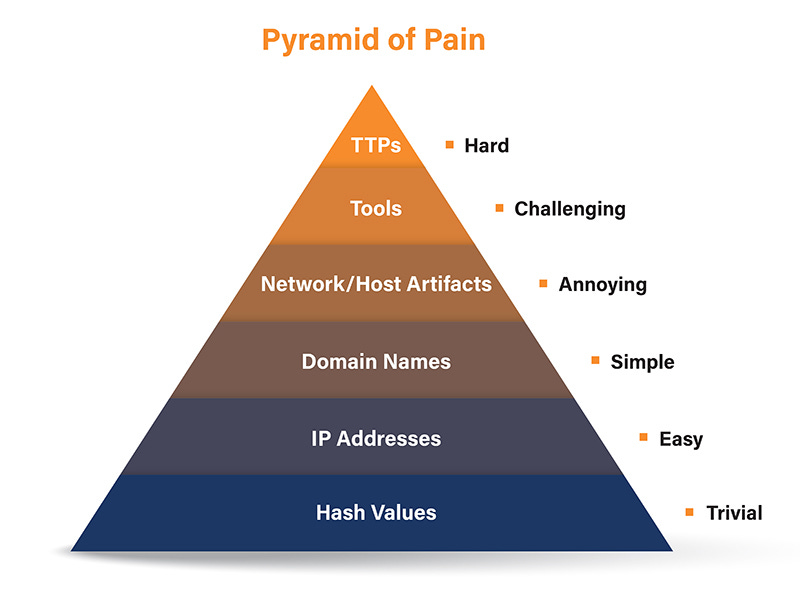
The Pyramid of Pain is a framework that describes the different levels of effort required by an attacker to conduct their malicious activities. At the bottom of the pyramid are easily changeable indicators, such as hashes, IP addresses, and domains. At the top are human-driven activities, such as the attacker's Tactics, Techniques, and Procedures (TTPs). Signature-based detection focuses on these lower levels of the pyramid, which can be easily changed by the attacker. In contrast, behavior-based detection, enabled by writing detection and response rules, AI, and ML is much more effective because it focuses on the higher levels of the pyramid, which are much harder for an attacker to change without fundamentally altering their attack. The hash of Mimikatzs may be changed, but it’s going to have to dump LSASS one way or another. By focusing on behavior, detection and response rules can detect and stop attacks that would otherwise evade signature-based detection.
I’d like to say another thank you to Eric Capuano for creating this lab which contains a lot of valuable information. I highly suggest checking out his substack which contains a lot more great info. Thank you for reading through, be on the lookout for more blog content coming soon!